
Thermostat wiring might seem complicated at first, but with the right guidance, homeowners can handle basic tasks like identifying wire types, understanding their functions, and troubleshooting common wiring issues. This guide is tailored to non-professionals, focusing on accessible language and practical steps to help you manage your HVAC wiring.
Why It Matters: Proper thermostat wiring ensures your HVAC system operates efficiently. Faulty wiring can lead to heating or cooling issues, energy waste, or damage to your equipment.
Who This Guide Is For: Designed for homeowners seeking clear, practical instructions for understanding thermostat wiring basics and resolving wiring-related challenges.
How to Identify Your Thermostat Wiring Type
Understanding the type of wiring in your thermostat is crucial for installation and troubleshooting. Here’s a step-by-step guide:
Step 1: Gather Tools
Essentials: screwdriver, flashlight, voltage tester, wire strippers, and a phone to document wiring connections.
Step 2: Turn Off Power
Turn off power to your HVAC system at the breaker. Use a voltage tester to ensure no current is flowing to your thermostat.
Step 3: Remove the Thermostat Faceplate
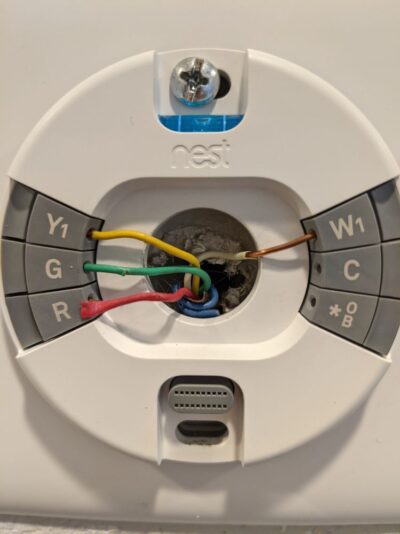
Carefully remove the thermostat faceplate to expose the wires. Take a clear photo of the wire connections, noting terminal labels and wire colors.
Step 4: Match Wire Colors to Functions
Most systems follow this standard color code:
Red (R): Power.
White (W): Heating.
Yellow (Y): Cooling.
Green (G): Fan control.
Blue/Black (C): Common wire for smart thermostats.
If your wiring does not match the standard, consult your HVAC manual or photo documentation.
Step 5: Identify System Type by Wire Count
Match your wire configuration to these common system types:
2-Wire Systems: Heating-only systems with connections to “R” and “W.”
3-Wire Systems: Heating and single-stage cooling systems using “R,” “W,” and “Y.”
4-Wire Systems: Systems with heating, cooling, and a fan connected to “R,” “W,” “Y,” and “G.”
5-Wire Systems: Smart thermostats or advanced systems with an added “C” wire.
Heat Pump Systems: Use an “O/B” wire for reversing valve control in addition to the above.
Step 6: Label Wires
Use labels (often provided with new thermostats) to mark each wire according to its terminal. This ensures clarity during installation or repairs.
Thermostat Wiring Color Codes and Functions
Understanding wire color codes is essential for working with thermostats. Below is a guide to common wire colors and their purposes:
Standard Wiring Colors and Their Functions
Red (R): Supplies 24V power from the HVAC system.
White (W): Activates the heating system.
Yellow (Y): Controls the cooling system.
Green (G): Operates the fan motor.
Blue/Black (C): Provides a continuous power source (common wire) for smart thermostats.
Additional Wires for Advanced Systems
Orange (O/B): Reversing valve control for heat pumps.
Aux/E: Auxiliary or emergency heat for heat pump systems.
Rc and Rh: Separate power terminals for cooling and heating in split systems.
What to Do If Wire Colors Don’t Match
Wiring may not always follow standard colors. Use the photo you took during Step 3 to trace connections. Consult your system manual or an HVAC professional if needed.
Testing the Wires: Use a multimeter to confirm the function of each wire before proceeding.
Common Thermostat Wiring Configurations
Thermostat wiring configurations vary by system type. Homeowners may encounter one of the following setups, and while they may seem different, they are typically easy to identify with a little guidance. Carefully matching wire labels and connections ensures compatibility and system functionality.
2-Wire Configuration
Heating-only systems.
Terminals: “R” (power) and “W” (heat).
3-Wire Configuration
Adds cooling to the system.
Terminals: “R” (power), “W” (heat), and “Y” (cooling).
4-Wire Configuration
Includes fan control in addition to heating and cooling.
Terminals: “R,” “W,” “Y,” and “G.”
5-Wire Configuration
Standard for smart thermostats or systems requiring a “C” wire for continuous power.
Terminals: “R,” “W,” “Y,” “G,” and “C.”
Heat Pump Configuration
Often includes an “O/B” wire to manage the reversing valve.
Additional wires for auxiliary or emergency heat (“Aux” or “E”).
Troubleshooting Thermostat Wiring Issues
When issues arise, check these common problems and solutions:
Problem: Thermostat Not Powering On
Solution: Verify connections to “R” and “C.” Ensure the circuit breaker is on.
Problem: HVAC System Doesn’t Respond
Solution: Double-check terminal connections and ensure wires are securely attached.
Problem: Incorrect Temperature Readings
Solution: Recalibrate the thermostat and ensure it’s not exposed to direct sunlight or drafts.
Problem: Error Messages on Smart Thermostats
Solution: Consult the thermostat manual for specific error codes. Check for proper wiring and internet connectivity.
Explore our Thermostat Wiring Guides

6 Wire Thermostat Wiring Diagram Guide
Are you planning to install a new thermostat or upgrade your existing one to a new one with 6 wires?

Coleman Mach Thermostat Wiring Guide
If you own a Coleman Mach air conditioning system and need to install or replace a thermostat, understanding the wiring

Emerson Thermostat Wiring [Full Guide]
In this guide, we’ll take you step-by-step through Emerson thermostat wiring and diagrams, making it a breeze for you to
Thermostat Wiring Color Code [Complete Guide]
Are you ready to take charge of your heating and cooling system? Look no further! In this comprehensive guide, we

Honeywell Thermostat Wiring For Heat Pumps
Ready to take charge of your home’s comfort? Look no further! Our ultimate guide to Honeywell thermostat wiring is here

Amazon Smart Thermostat Wiring Diagram for Heat Pump [Full Guide]
Are you considering upgrading your home’s thermostat to an Amazon smart thermostat? In this guide , we’ll provide step-by-step instructions
Thermostat Wiring FAQ
Frequently Asked Questions
What are the standard thermostat wire colors?
Standard colors include Red (R) for power, White (W) for heat, Yellow (Y) for cooling, Green (G) for fan, and Blue/Black (C) for the common wire.
Do I need a C wire for a smart thermostat?
Most smart thermostats require a C wire for continuous power. If your system lacks one, consider using a power extender kit or consulting a professional.
How do I troubleshoot a thermostat that isn’t working?
First, check for loose or disconnected wires. Verify power at the breaker and ensure the thermostat is compatible with your HVAC system.
What is the purpose of the O/B wire?
The O/B wire controls the reversing valve in heat pump systems, switching between heating and cooling modes.
How do I test thermostat wiring?
Use a multimeter to check for voltage and continuity. Test each wire to confirm its function and ensure proper connections.
How do I wire a Nest thermostat?
Nest thermostats use standard connections. Match your existing wires to the labeled terminals on the Nest base (e.g., "R," "W," "Y," "G," and "C") and follow the app's setup instructions.
What is the color code for 4-wire thermostat wiring?
A typical 4-wire setup includes Red (R) for power, White (W) for heat, Yellow (Y) for cooling, and Green (G) for fan control.
Can I use a thermostat without a C wire?
Yes, many thermostats can operate without a C wire by using alternative methods such as a power extender kit or battery power.
How do I wire a thermostat for a heat pump?
Heat pump systems often require additional wires like the O/B wire. Refer to your thermostat’s manual for heat pump-specific wiring instructions, ensuring connections for auxiliary heat and reversing valve control are correct.
How do I identify old thermostat wiring?
Take a photo of the old thermostat’s wiring before removal. Match wire colors and terminal labels to your new thermostat's instructions. Consult a professional if wires are unlabeled or damaged.
What tools do I need for thermostat wiring?
Basic tools include screwdrivers (flathead and Phillips), wire strippers, voltage tester, multimeter (for testing continuity and voltage), and labels for marking wires.
What should I do if my thermostat wiring doesn’t match the manual?
If the wiring doesn’t match, compare your existing setup to the standard configurations. Use your photo as a reference and consult your HVAC manual or a professional for guidance.
What is the difference between Rc and Rh wires?
The Rc wire provides power to the cooling system, while the Rh wire provides power to the heating system. In some systems, these are combined into a single R wire.
How do I extend thermostat wires?
To extend thermostat wires, use wire nuts to connect additional wire lengths to the existing wires. Ensure the new wires are securely connected and properly labeled to avoid confusion during installation.
Can I use a smart thermostat with a two-wire system?
Yes, but it often requires a power adapter or transformer to provide continuous power. Some smart thermostats are specifically designed to work with two-wire systems.
How do I fix a thermostat that’s not connecting to Wi-Fi?
Ensure the thermostat is properly wired and powered. Check your Wi-Fi settings and ensure the network is compatible with your thermostat. Restart both your thermostat and router if necessary.