
SAFETY: Turn off power at the breaker or the furnace switch before touching any thermostat wiring. Confirm the display is dark before pulling the old thermostat off the wall.
Usually, yes. But verify it first. Blue is the most common wire-color convention for C (common), the wire that gives a Nest constant 24V power. It is not a rule anyone enforces. On Rheem and Ruud heat pumps specifically, a blue wire is just as likely to be B, the reversing-valve terminal, and landing it on C instead can cause real problems: a Nest that reboots, a heat pump that blows cold air on heat, or a shorted board fuse.
Two checks settle it in under five minutes. Do them before you land anything.
TL;DR
| What you find | What it means |
|---|---|
| Blue wire was on the old thermostat’s C terminal | It’s your C wire. Land it on the Nest’s C connector. |
| Blue wire was on the old thermostat’s B terminal | It’s the reversing valve (Rheem/Ruud heat pump). Land it on OB, not C. |
| No old thermostat to check, but R-to-blue reads ~24–28V AC with the system idle | Common. Safe to use as C. |
| R-to-blue reads 0V when idle, then jumps during a heat call | Not common — it’s switched, so it’s B or another call wire. |
| No blue wire at all, or it’s already spoken for | See how to install a thermostat without a C wire for your other options. |
| Wire color (typical) | Terminal | What it does |
|---|---|---|
| Red | R (or Rc / Rh) | 24 V AC power from the transformer. Rc = cooling power, Rh = heating power; one system uses a jumper between them. |
| White | W (W1, W2) | Heat call. W2 is second-stage or auxiliary heat. |
| Yellow | Y (Y1, Y2) | Cooling call — energizes the compressor contactor. On heat pumps, Y runs the compressor for heating too. |
| Green | G | Indoor fan (blower) relay. |
| Blue | C | Common — completes the 24 V circuit and gives smart thermostats constant power. Sometimes black. |
| Orange | O (or O/B) | Heat-pump reversing valve, energized in cooling (most brands). |
| Dark blue | B | Heat-pump reversing valve, energized in heating (Rheem/Ruud). Occasionally used as C — verify. |
| Brown | E | Emergency heat — manual backup that locks out the compressor. |
| Varies | AUX | Auxiliary heat — automatic electric backup on heat pumps. Often shares a wire with W2. |
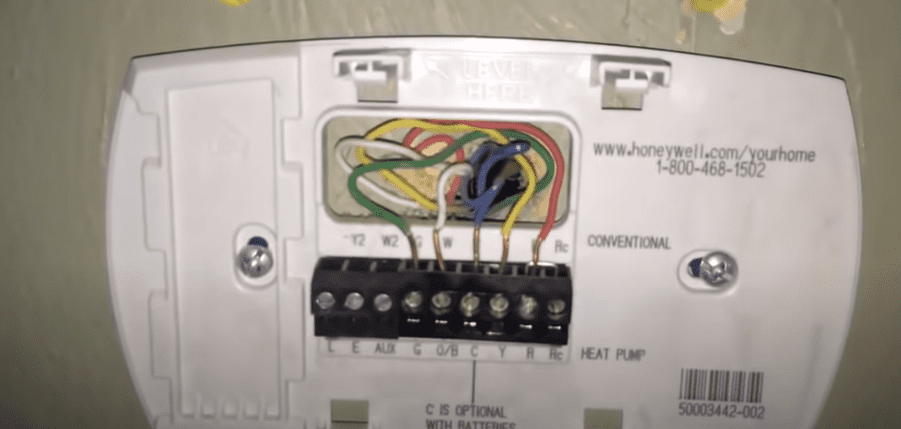
Check 1: what terminal was the blue wire on before?
The fastest and most reliable check doesn’t need a meter. Look at (or recall from your photo of) the old thermostat’s terminal block. Whatever letter the blue wire sat on, that’s its job. The color never changes what it does, only the letter does.
- On C: it’s common. Move it to the Nest’s C connector and you’re done.
- On B: it’s the heat-pump reversing valve, energized in heating on Rheem and Ruud systems. Landing a B wire on Nest’s C terminal does not damage anything immediately, but it also doesn’t give the thermostat real power, and it leaves the reversing valve wire disconnected, so the heat pump will run in the wrong mode or not switch at all.
- On something else (Y2, W2): rare, but it happens on relabeled or spliced-in cable. Go by the letter, not the assumption.
If the old thermostat is already off the wall and you didn’t photograph the terminals, move to the multimeter check.
Check 2: the multimeter test
With power restored and the thermostat off its base (wires still landed at the equipment end), set a multimeter to AC volts:
- Measure from the R wire to the blue wire.
- A steady 24 to 28V AC, whether or not the system is calling for heat or cool, confirms common. That’s a live, unswitched wire, exactly what C is supposed to be.
- 0V at idle that jumps to ~24V only during a heat call means it’s B, not C. B is switched by the reversing valve logic, not a constant feed.
This test works regardless of what the wire was labeled before, which makes it the fallback when you don’t have the old thermostat’s terminal block to check.
Why the mix-up happens on heat pumps specifically
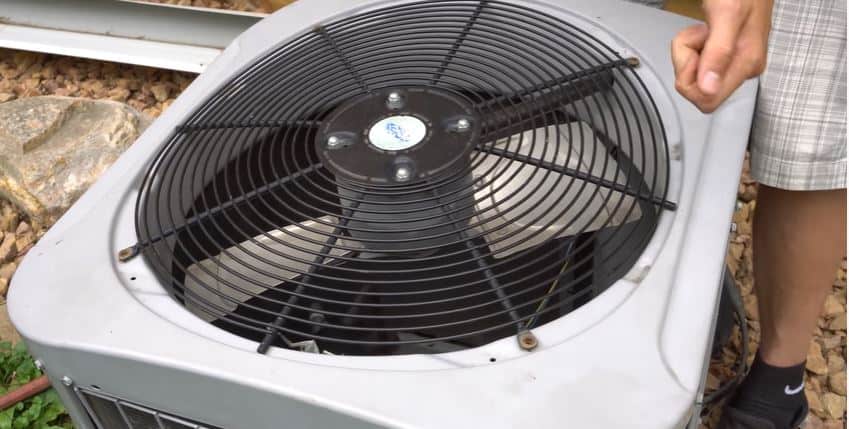
On a conventional furnace-and-AC system, there’s no B terminal, so a blue wire showing up is almost always C — there’s nothing else for it to be. Heat pumps are where this gets ambiguous, because Rheem and Ruud use B (not O) for the reversing valve, and installers sometimes ran blue for both jobs across different homes. Google Nest’s own wire-identification documentation calls this out directly and tells installers to check the terminal, not guess from the color. If your outdoor unit is a Rheem or Ruud, treat the blue wire as a coin flip until you’ve run one of the two checks above.
If the blue wire isn’t C
A wrong guess here is recoverable, not dangerous, as long as you verify before you power the system back up with everything landed. If your check shows the blue wire is spoken for (it’s actually B) or you don’t have a spare conductor at all:
- Look for another spare wire in the bundle. A 5-wire cable with only 4 wires connected at the old thermostat often has an unused conductor tucked behind the wallplate, and it isn’t necessarily blue.
- Install the Nest Power Connector. Google’s official adapter installs at the HVAC control board and creates power for the thermostat without pulling new cable.
- As a last resort, some installers repurpose the G (fan) wire as C by jumpering G to Y at both ends, which powers the thermostat but gives up independent fan control. It’s not a Nest-documented method and it’s a trade-off, not a first choice.
The full comparison of every no-C-wire option, including power-stealing and Add-a-Wire adapters, is in how to install a thermostat without a C wire. For every other terminal and wire count, start with the thermostat wiring guide. If you’re installing a Nest specifically and want the full connector-by-model rundown, see Nest thermostat wiring.
⚠️ Know when to stop
Thermostat wiring is 24 V AC low voltage — safe to handle once you cut power at the breaker (do it anyway; a short can kill the transformer or blow the board fuse). But stop and call an HVAC pro or electrician if you hit any of these:
- Line voltage (120/240 V): thick wires with wire nuts, often on baseboard or wall-heater thermostats. Miswiring these can injure you or start a fire.
- Gas components: anything past the furnace control board — gas valves, ignitors, pilot assemblies.
- Refrigerant lines or sealed-system parts on heat pumps and AC units.
- No idea which system you have: if the wiring doesn’t match any diagram here, photograph it and get a pro’s eyes on it before guessing.
FAQ
Is the blue wire always the C wire on a Nest?
No. It’s the most common convention, but nothing enforces it. Check the terminal label on your old thermostat, or measure R to blue with a multimeter: a steady 24–28V AC at idle confirms common.
What happens if I put the wrong wire on C?
If it’s actually B (the heat-pump reversing valve) and you land it on C, the thermostat won’t get real power from it and the reversing valve won’t get its signal. The heat pump can run in the wrong mode or fail to switch between heat and cool. It’s a functional problem, not a safety one, and it’s fixed by moving the wire to the correct terminal.
My blue wire tests as B, not C. What do I do?
Land it on the Nest’s OB connector instead, and set O or B in the thermostat’s installer menu (B for Rheem/Ruud). You’ll then need a real C-wire solution — a spare conductor, the Nest Power Connector, or one of the other options in the no-C-wire guide.
Do I need a C wire for a Nest at all?
Not always — Nest can run on power sharing on many systems. But if you see Wi-Fi drops, clicking relays, or “Delayed” messages, it needs real power, and a correctly identified C wire is the cleanest fix. Details in Nest thermostat wiring.
Last reviewed: July 2026